Competencies
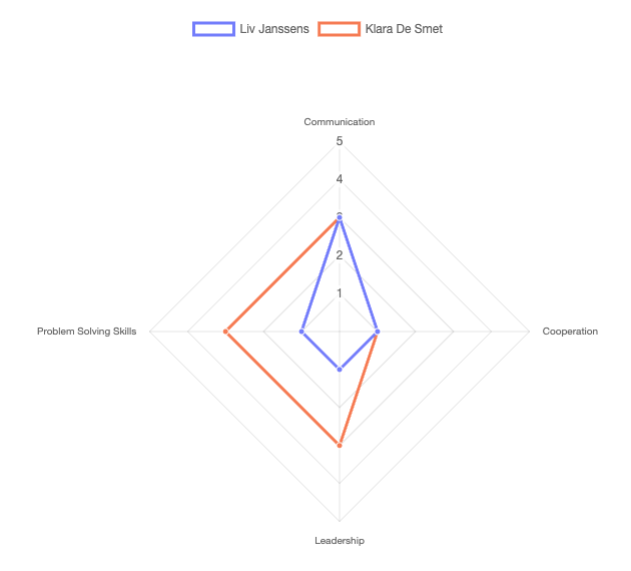
Competencies help you categorize review questions by skill area (like Communication, Leadership, Problem Solving,.. ). Once assigned, Skoop visualizes results in a radar chart, making it easy to see performance patterns and identify development opportunities for your employee.
Written By Kjell
Last updated 3 months ago
What are Competencies?
Competencies are skill or ability categories that you can use to organize and analyze performance review questions. By assigning competencies to questions, you can:
Categorize questions by skill areas (e.g., Communication, Leadership, Problem Solving)
Measure performance across different dimensions
Visualize results with radar charts showing scores per competency
Track development in specific skill areas over time
Manage Competencies
Go to your Organization settings
Click on Competencies in the settings navigation
You'll see a list of all competencies in your workspace, or a button to create your first competency if none exist yet.
Note: Only users with the HR role can manage competencies. (Want to manage roles? Click here:
https://hejj.featurebase.app/help/articles/0144632-assign-different-roles)
Assigning Competencies to Questions
Once you've created competencies, you can assign them to questions in your review templates:
Open a question for editing
Click the wrench/settings icon
Select a competency from the dropdown menu
The competency badge will appear on the question, indicating which skill area it measures.
Viewing Competency Results
When viewing completed performance reviews, competency data is visualized in a radar chart:
Each axis represents a competency
The chart shows average scores per competency
Easily compare performance across different skill areas
Identify strengths and areas for development at a glance
This visualization helps managers and employees understand performance patterns across different competency dimensions.
Best Practices
Keep it simple: Start with 4-8 core competencies that align with your organization's values
Be consistent: Use the same competencies across related reviews for meaningful comparisons
Be specific: Choose clear names like "Written Communication" rather than vague terms like "Skills"
Align with goals: Map competencies to your organization's performance framework or career development paths
Common Competency Examples
Communication
Leadership
Problem Solving
Teamwork & Collaboration
Technical Expertise
Adaptability
Customer Focus
Initiative
Time Management
Strategic Thinking
…
Was this helpful?
Still need help? Ask the team